
New · Nadine Vault by Nadine Cloud

Your files. Your space. Anywhere.

Nadine Vault backs up your photos, videos and documents to the cloud, so they're safe even if your phone is lost, stolen or broken. Start with 2 GB free and add more space whenever you need it.
  • 2 GB free, forever
  • Automatic photo & video backup
  • Upload and open any file
  • Fingerprint app lock
  • Encrypted storage
  • Pay with MTN, Airtel or Zamtel
Android app · coming soon to Google Play
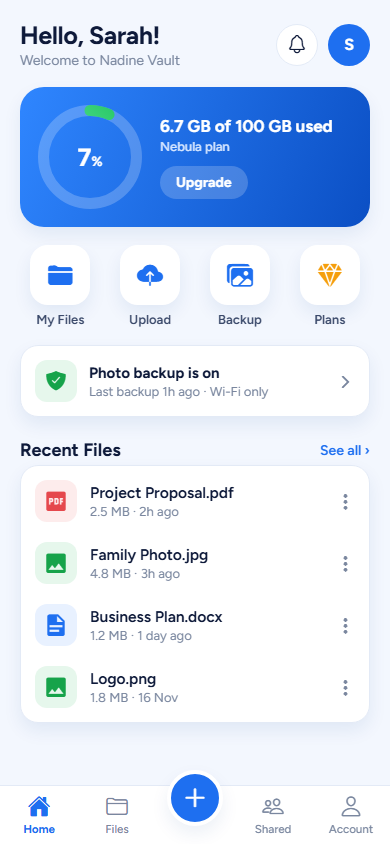
Nadine Vault home screen showing storage used and recent files
How it works

Safe in three simple steps

1. Install & sign up

Download the app, create your account and you instantly get 2 GB of free space.

2. Turn on backup

Your photos and videos upload on their own over Wi-Fi. Add any other file with one tap.

3. Open them anywhere

Your files stay locked behind your password and fingerprint, ready whenever you need them.

Storage plans

Start free. Grow when you need to.

All prices are per month. Pay inside the app with Nadine Pay — mobile money (MTN, Airtel, Zamtel).

Orbit

Try it free — for your most important files
Free
2 GBStorage
  • Photo & video backup
  • Any type of file
  • Fingerprint lock
  • Encrypted storage
Start free

Luna

For everyday phone backups
ZMW 25 /month
10 GBStorage
  • Photo & video backup
  • Any type of file
  • Fingerprint lock
  • Encrypted storage
Choose Luna

Nebula

For families and small businesses
ZMW 120 /month
100 GBStorage
  • Photo & video backup
  • Any type of file
  • Fingerprint lock
  • Encrypted storage
Choose Nebula

Galaxy VIP

For creators and heavy users
ZMW 350 /month
500 GBStorage
  • Photo & video backup
  • Any type of file
  • Fingerprint lock
  • Encrypted storage
Choose Galaxy
Questions

Nadine Vault FAQ

When can I download the app?

Nadine Vault for Android is launching on Google Play soon. Email us for early access and we'll let you know the moment it's live. An iPhone and computer version will follow.

Where are my files stored?

Your files are encrypted and stored in a secure, professional data centre in the European Union (Amsterdam). Only you can see them — we never sell or share your files.

How do I pay for more space?

Inside the app, choose a plan and pay with mobile money through Nadine Pay. Your extra space is ready straight away. Plans are billed per month.

What happens if I lose my phone?

Just install Nadine Vault on your new phone and sign in — all your backed-up photos, videos and files are still there.

Be the first

Get Nadine Vault early

Join the early-access list and start with 2 GB free.